
The problem line is already on your screen.Lumi makes sure you see it.
Your team works in grids full of order lines, PO lines and bill lines — and somewhere in there is the one that costs you money. Lumi colors it red, amber, green or blue as you work, using rules your own people write in minutes. No code, no developer, no report to run.
Up to 145 Acumatica screens · 40 ready-made rules · nothing to implement
Acumatica 2026 R1 and later, Modern UI
What color is your business running on?
Every order screen in Acumatica is hiding the line that costs you money. Here is how that story usually goes.
Red — it already happened
An order went out below margin. One line, priced too low, nobody noticed. Your bottom line did.
A must-have item never shipped. Nobody saw at order entry that the stock wasn't there — your customer found out before you did.
Amber — you've tried to fix it
More reports. Another spreadsheet. “Please double-check before you save.” All after the fact — all relying on someone noticing.
Green — you found Lumi
Lumi colors the line while the order is being entered. Stock short? Red. Margin thin? Red. Lumi runs the cross-checks in the background — your team just sees the color and fixes it before they hit Save.
No code. No developers. Your own team writes the rules in minutes — and every rule explains itself in plain English.
| Inventory ID | Line Description | Warehouse | Qty | Unit Price | Disc % | Unit Cost | Margin % |
|---|---|---|---|---|---|---|---|
| AACOMPUT01 | Acer Laptop Computer | RETAIL | 1.00 | 500.00 | 0.000000 | 250.00 | 47.37 |
| AAMACHINE1 | Injection molding machine | WHOLESALE | 5.00 | 26,000.00 | 0.000000 | 20,000.00 | 19.03 |
| AM350WINDO | 350 Series Window | WHOLESALE | 1.00 | 0.00 | 0.000000 | 0.00 | — |
| ADVERT | Advertising | 1.00 | 200.00 | 50.000000 | 0.00 | — |
Rules that fired
LUMI-SO-INSTOCK— the whole open quantity can be shippedLUMI-SO-MARGINREVIEW— margin between 10% and 20%LUMI-SO-NOSTOCK— no stock available to ship the lineLUMI-SO-NOPRICE— line has not been pricedLUMI-SO-NOCOST— cost information is missingLUMI-SO-DISCOUNT— discount over the permitted thresholdLUMI-SO-NOWHSE— warehouse missing on a stock item
Critical · Red
A value or line that is wrong, or must not proceed — a missing cost, a negative margin.
Warning · Amber
Something to look at before acting — a thin margin, a large discount, a date that has slipped.
Good · Green
Confirmed as it should be — a healthy margin, a line that can be shipped in full.
Info · Blue
Worth noticing, but neither good nor bad — a manual price, a return, a direct invoice.
The meaning of a color never changes. Only how loudly it is stated.
Stop reviewing every row. Start reading the signal.
A sales order with forty lines looks exactly the same whether every line is in stock or none of them are. The usual way to find out is to check all forty, one at a time. Your team already knows what a good transaction looks like — Lumi applies that judgment to every line, automatically, so the exceptions surface themselves.
Caught at entry, not at month end
Zero-priced lines, missing costs, over-receipts, unbalanced journals, negative margins. Lumi flags them on screen while someone is still looking at the document and can still fix it — not in a variance report three weeks later.
Configuration, not code
A rule is four answers on one Acumatica screen: which grid, what has to be true, which documents, what it should look like. Lumi writes the plain-English summary as you build, so you can read back exactly what it will do before you save. No formulas, no scripting, no developer.
One language across the whole flow
Sales orders, shipments, purchase orders, receipts, bills, invoices, journals, reconciliations and the processing screens where documents get released in bulk. Then inventory, requisitions, payments, time and expenses, CRM, fixed assets and contracts, plus industry editions for Field Service, Manufacturing, Professional Services and Construction. Red means the same thing on all of them.
Built for
Order desk and sales ops
Stock and margin checked at entry, on every line, before the order is saved.
Built for
AP and finance
Unmatched bills, missing accounts and unbalanced journals flagged before anyone releases them.
Built for
Partners and VARs
Give your customers exception highlighting with no custom code to write, deploy or carry through upgrades.
Every rule answers four questions.
That is the whole model. Everything else is detail on those four answers — which is why a business user can build one in ten minutes and read it back a year later.
Which screen and which grid?
Screen ID and View. Some screens have more than one grid Lumi can color — on Sales Orders you can write rules against the lines, the shipments or the payments, independently.
What has to be true?
The Conditions tab, evaluated against each row in the grid. Different lines on the same order give different answers — which is why some go amber and others do not.
Which documents does this apply to?
The Document Scope tab, evaluated against the document on screen. Customer, customer class, vendor, vendor class, document type. Same answer for every line on the order.
What should it look like?
A preset — a meaning and an intensity — or your own background and text colors, with a live preview and a contrast check.
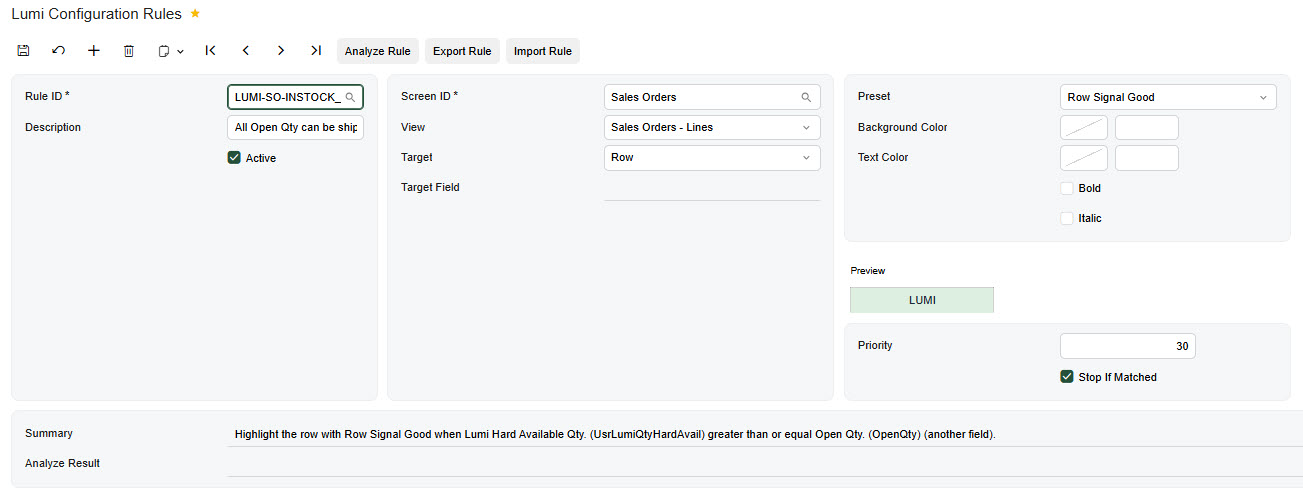
A meaning, how loudly to say it, and what to say it about.
Presets are not one flat list of colors. They are built from three choices, which is what keeps a hundred rules across a hundred screens legible to someone who did not write them.
Four meanings — the color
Two targets — the scope
Row
Shades the whole line. Carries the overall verdict.
Cell
Deeper, so it stands clear of a row already shaded.
Three intensities — the volume
A preset is named for all three: Row Signal Warning, Cell Beacon Critical. Row Signal Warning and Row Beacon Warning are both amber — one whispers, the other shouts. Change the Target and Lumi remaps your preset to the matching one, so you keep the meaning and intensity you chose.

Same order, same rules — only the volume changes. The meaning of a color never does.
Custom colors, with a guard rail
Override any preset with your own hex values. Set a background and leave the text color empty and Lumi suggests a readable one; set both and it checks the contrast ratio and warns you below 4.5:1. Grid text is small and users scan it quickly — take the warning seriously.
You do not start from a blank screen.
Lumi ships with forty ready-made rules covering the common exceptions on thirteen of the Core screens. Activate the ones that fit, move the thresholds to your business, switch off the rest. They are worth reading even if you write your own, because they show the pattern for each screen.
Sales Orders
SO301000
LUMI-SO-NOSTOCK
No stock available to ship the lineLUMI-SO-LOWMARGIN
Margin below 10%LUMI-SO-DISCOUNT
Discount over the permitted thresholdLUMI-SO-PARTIAL
Only part of the open quantity can be shippedLUMI-SO-MARGINREVIEW
Margin between 10% and 20%LUMI-SO-PASTDATE
Requested date is in the past, quantity still openLUMI-SO-INSTOCK
The whole open quantity can be shippedLUMI-SO-MANUALPRICE
Price was overridden by hand
…plus NOPRICE, NOCOST, NOWHSE and NOPOLINK.
Purchase Orders
PO301000
LUMI-PO-NOCOST
No cost entered on the lineLUMI-PO-LATEPROMISE
Vendor's promised date is after the date requiredLUMI-PO-NOPROMISE
Promised date missing on an open lineLUMI-PO-OVERRECEIPT
More received than orderedLUMI-PO-NOWHSE
Warehouse missing on a goods-for-inventory line
Purchase Receipts
PO302000
LUMI-PR-ZEROQTY
Receipt quantity is zeroLUMI-PR-OVERRECEIPT
Received more than orderedLUMI-PR-QTYVAR
Received less than orderedLUMI-PR-NOWHSE
Warehouse missingLUMI-PR-RETURN
Line is a return
Shipments
SO302000
LUMI-SH-NOLOCATION
Quantity shipped with no location setLUMI-SH-OVERSHIP
Shipped more than orderedLUMI-SH-UNDERSHIP
Shipped less than orderedLUMI-SH-BACKORDER
Quantity remains on back order after shipment
Bills and Adjustments
AP301000
LUMI-AP-NOACCOUNT
Required account missingLUMI-AP-ZEROAMOUNT
Quantity present but the line amount is zeroLUMI-AP-COSTVAR
Bill has a cost variance against the receiptLUMI-AP-UNMATCHED
Bill line not matched to a PO or receipt
Journal Transactions
GL301000
LUMI-JE-NOACCOUNT
Account missingLUMI-JE-DRCR
Both debit and credit populated on one lineLUMI-JE-EMPTYLINE
Line has neither a debit nor a credit
Starter rules on seven more screens
Including the processing screens, where a bad document is easiest to release by accident. Every other supported screen is ready for your own rules from day one.
Is the revenue account missing?
Is the document a refund?
Is the document a refund?
Is this line still unreconciled?
Is the vendor missing?
A direct invoice, with no shipment or order behind it?
Is this document a credit memo?
Start with Core. Add the packs that match your Acumatica.
Lumi Core covers the 20 screens almost every Acumatica company uses every day. Packs and industry editions add the rest. Install only the ones that match the modules you have. Lumi offers a screen in the rule designer only when its pack is installed and the matching Acumatica feature is switched on, so nobody builds rules for a screen they can't open.
Lumi Core
20 screens · always included
Sales orders, shipments, invoices, purchase orders and receipts, bills, checks and payments, AR invoices and payments, journal transactions, bank reconciliation, and the release, prepare-payment and approval screens.
Core packs
59 more screens
- 15
Financials
Approving and paying bills, statements, retainage, cash transactions and deposits.
- 18
Distribution
Inventory receipts, issues, transfers, adjustments, physical counts, kits, landed costs, requisitions.
- 8
Time and Expenses
Expense claims and receipts, time cards, releasing claims and time cards.
- 11
CRM
Leads, opportunities, sales quotes and cases.
- 7
Advanced Financials
Customer contracts and contract billing, fixed asset transactions and depreciation.
Industry editions
66 more screens
- 13
Field Service
Service orders, appointments, schedules and service contracts.
- 24
Manufacturing
Bills of material, production orders, estimates, MRP and the configurator.
- 14
Professional Services
Projects, project billing, pro forma invoices and time approvals.
- 15
Construction
Subcontracts, progress worksheets, RFIs, project issues and daily field reports.
One license, one rule designer, one color system across all 145 screens. Core, every pack and every industry edition are included in the $1,200 a year. No per-module pricing, and no upsell when you add Manufacturing next year.
Built for a team, not a single admin.
A color says something is wrong. Lumi also says why, what to do about it and who owns it, and shows each team the rules that are theirs.
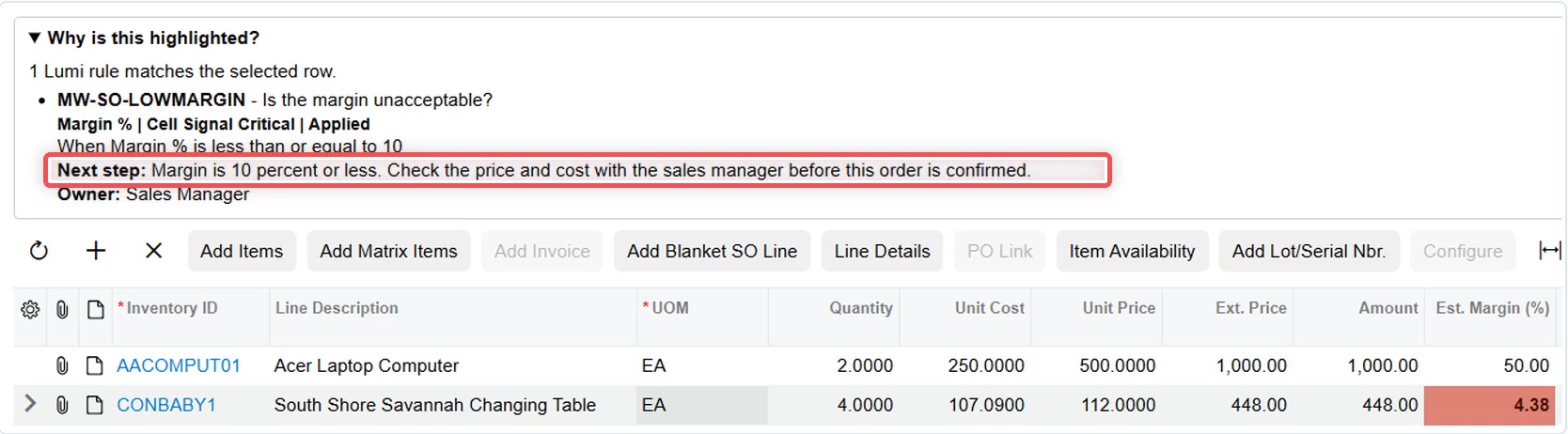
Why is this highlighted?
Click a colored row and Lumi lists the rules that fired, in plain English. Live on key sales, purchasing, AP/AR and field service screens. Anyone who would rather not see it switches it off in My Lumi Preferences (LM102000).
Rule sets for each team
Group rules into named sets on Lumi Rule Sets (LM201000) and show each set to the roles or branches it is for. The warehouse sees stock rules; credit control sees credit rules.
A next step and an owner on every rule
Each rule can say what to do about the row and which workgroup owns it. That turns “it’s red” into “it’s red: ring the vendor; Purchasing owns this”.
Draft, publish, schedule, roll back
Switch on governed publication and rule changes go through a draft, publish with a reason, can take effect on a future date, and roll back to an earlier release. It is off by default, so small teams keep the simple save-and-go flow.
Your own custom fields
Custom Field Discovery picks up your Usr fields, and an administrator approves which ones rule builders may use.
Every rule on one list
Process Lumi Rules (LM501000) filters every rule by screen, owner, set or status and activates them in bulk. Check Conflicts warns you before two rules compete for the same row.
One key, one screen, once.
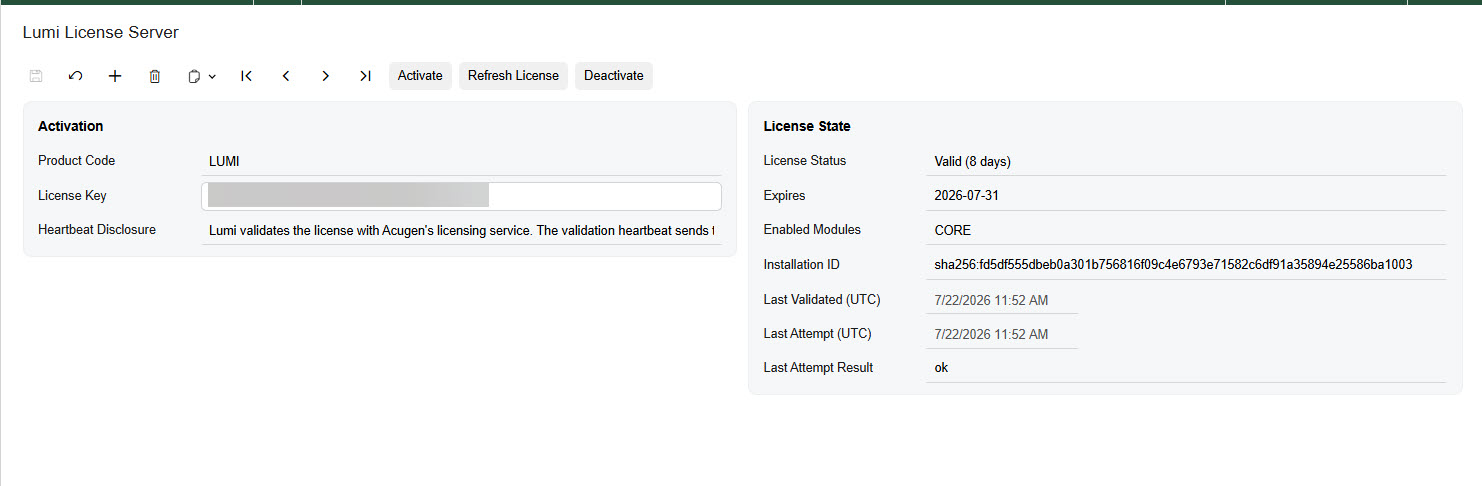
Activation happens once per installation on Lumi License Server (LM101000). Paste the key, click Activate, and the License State section fills in with the status and the expiry. Refresh License picks up a renewal without re-entering anything; Deactivate releases the key so it can be used on different hardware.
$1,200 a year. Unlimited users, unlimited rules, every pack and edition.
Non-production tenants are free. Pioneer pricing runs to 31 December 2026.
A lapsed license never stops Acumatica. There is a grace period, then the colors simply switch off.
Your data never leaves your tenant. Lumi runs entirely inside Acumatica. The license heartbeat sends identifiers, version numbers, license status and counts of rules and enabled screens — and the disclosure text on the activation screen says so in full. No transaction data is sent, ever.
Worth knowing before you buy, not after.
Set this expectation with your team early. It saves a great many support questions.
It never blocks anything
Lumi does not stop a user saving a document, releasing a batch or shipping an order. It colors rows. If the license lapses, the colors stop and Acumatica behaves exactly as it did before.
It is a screen aid
Colors do not appear in Excel exports, on printed forms and reports, or in the Acumatica mobile app. If someone needs the same information outside the screen, that is a generic inquiry or a report — not a Lumi rule.
Modern UI, entry and processing screens
Lumi colors Modern UI screens. On 2026 R1, a screen still set to the classic UI won't color. Generic inquiries are out of scope — they have their own style rules built into Acumatica.
What buyers ask before a trial.
- Does Lumi change my data?
- No. It colors rows and cells on screen. It never edits a document and never stops anyone saving, releasing or shipping.
- What happens when we upgrade Acumatica?
- Lumi is built only on Acumatica's documented Modern UI extension points, so an upgrade means a re-test, not a rewrite. Compatibility updates for both annual releases are included.
- Can rules use our custom fields?
- Yes. Custom Field Discovery finds your Usr fields, and an administrator approves which ones rule builders may use.
- Can different teams see different rules?
- Yes. Put rules into rule sets and show each set to the roles or branches it is for.
- Are packs and industry editions extra?
- No. Core, every pack and every industry edition are included in the $1,200 a year. Install only the ones that match the Acumatica modules you use.
- Which Acumatica versions does Lumi support?
- Acumatica 2026 R1 and later, on the Modern UI.
There is a lot more under the surface.
If you want to know what happens after the demo — the full condition set, how competing rules resolve, every screen covered, and how a proven rule set moves into production — it is all here.
Simple on the surface. Real depth underneath.
What keeps Lumi useful after the demo is everything below.
Nineteen conditions
- Exact match
- EqualsDoes Not Equal
Any field. Case-insensitive.
- Comparison
- Greater ThanGreater Than or EqualLess ThanLess Than or EqualIs Between
Numbers, dates, amounts. Is Between takes two values and is inclusive.
- Text
- ContainsDoes Not ContainStarts WithEnds With
Searching descriptions, IDs and codes.
- Presence
- Is NullIs Not Null
Whether a field is filled in at all. No value needed.
- Relative date
- Is TodayIs Before TodayIs After TodayIs Within Next N DaysIs Within Last N DaysIs More Than N Days Ago
Measured against the Acumatica business date, not a hard-coded date.
Fields Acumatica does not give you
Alongside every standard field on the grid, Lumi adds its own. They come with the product — nothing to install, nothing to switch on — and they are what make the availability and classification rules possible in the first place.
- Lumi Available Qty.
- Available quantity, using Acumatica's own availability calculation rules.
- Lumi Hard Available Qty.
- What can actually be shipped: physical stock in the warehouse, less anything hard-allocated to another order, shipment or transfer.
- Lumi On Hand Qty.
- The physical stock sitting in the warehouse right now.
- Lumi Item Class
- The item class of the line's stock item.
- Lumi Item Price Class
- The item price class of the line's stock item.
- Lumi Item Price Workgroup
- The item's price workgroup, also known as the item product workgroup.
- Lumi Vendor Class
- The vendor class for the line.
Compare a field to another field
A value is not always the useful comparison. Set Compare To to Another Field and the condition tests one column against another — available quantity against open quantity, promised date against required date, received against ordered.
Conditions combine with And/Or in the order they are listed, and bracket columns let you say what plain left-to-right ordering cannot — status is Open, and either the amount is over 10,000 or the customer is on hold. Brackets have to balance, or the rule will not validate.

Several rules will match the same row. You decide what wins.
Rows or cells
Color the whole line, or a single cell. The pattern that works: one row rule carrying the overall verdict, then cell rules marking the specific values that are wrong — the unit price, the discount, the margin. Cell presets are deeper than row presets, so a flagged cell still stands clear of a line the row rule has already shaded.
Priority decides the winner
Rules are evaluated in ascending priority order — lower number, considered earlier. The default is 100. Give every rule on a screen a distinct priority, and number them 10, 20, 30 rather than 1, 2, 3 so you can slot a new one between two existing rules later without renumbering everything.
Stop If Matched
When a rule matches and Stop If Matched is set, evaluation ends there and no lower-priority rule is considered for that row. It is on by default, and for most rules that is what you want.
Conditions test rows; scope tests the document
This is the distinction that matters most. Is this line's available quantity below its ordered quantity? That is a condition. Is this order for a customer in the WHOLESALE class? That is document scope — the same answer for every line, so it decides whether the rule runs on that document at all. Applies When narrows; Except When removes.

Analyze Rule tells you what will actually happen
Save a rule and run Analyze Rule. The Conflict Check tab lists every rule that overlaps this one, most severe first, and for each one it says what is happening, which rule wins given the priorities and Stop If Matched settings, and how to fix it. Overlap is not automatically a problem — banded traffic-light sets are built on it. What you are looking for is an overlap where the winner is not the rule you intended.
Lumi Core: twenty screens, twenty-four grids.
Entry screens and processing screens across sales, purchasing, payables, receivables, approvals, cash and the general ledger. The packs and industry editions add 125 more screens, for 145 in all.
| Screen ID | Screen | Grids you can color |
|---|---|---|
| AP301000 | Bills and Adjustments | Lines |
| AP302000 | Checks and Payments | Documents to Apply |
| AP501000 | Release AP Documents | Documents |
| AP503000 | Prepare Payments | Documents |
| AR301000 | Invoices and Memos | Lines |
| AR302000 | Payments and Applications | Documents to Apply |
| AR501000 | Release AR Documents | Documents |
| CA302000 | Reconciliation Statements | Transactions |
| EP503010 | Approvals | Documents |
| GL301000 | Journal Transactions | Details |
| GL501000 | Release Transactions | Batches |
| PO301000 | Purchase Orders | Lines |
| PO302000 | Purchase Receipts | Lines |
| PO505000 | Create Purchase Orders | Fixed Demand |
| SO301000 | Sales Orders | Lines · Shipments · Payments |
| SO302000 | Shipments | Lines · Orders · Packages |
| SO303000 | Invoices | Lines |
| SO501000 | Process Orders | Orders |
| SO503000 | Process Shipments | Orders |
| SO505000 | Process Invoices and Memos | Documents |
Prove it in test. Move it to production in a file.
Rules belong to the tenant they were created in. Export writes a rule, its conditions and its document scope rows to a single XML file; import reads it back in another tenant, with an explicit choice about whether an existing rule of the same ID may be replaced.
Export
Save the rule, click Export Rule, and Lumi writes LumiRule-<Rule ID>.xml to your machine. A rule must be saved before it can be exported, so the file always matches the rule.
Import
Import Rules from one tenant to another, options are in place to prevent existing rules being overwritten.
Activate in bulk
Process Lumi Rules (LM501000) lists every rule in the tenant with its screen, view, target, preset and priority, and activates or deactivates a whole set in one action. Then run Check Conflicts on each affected screen.
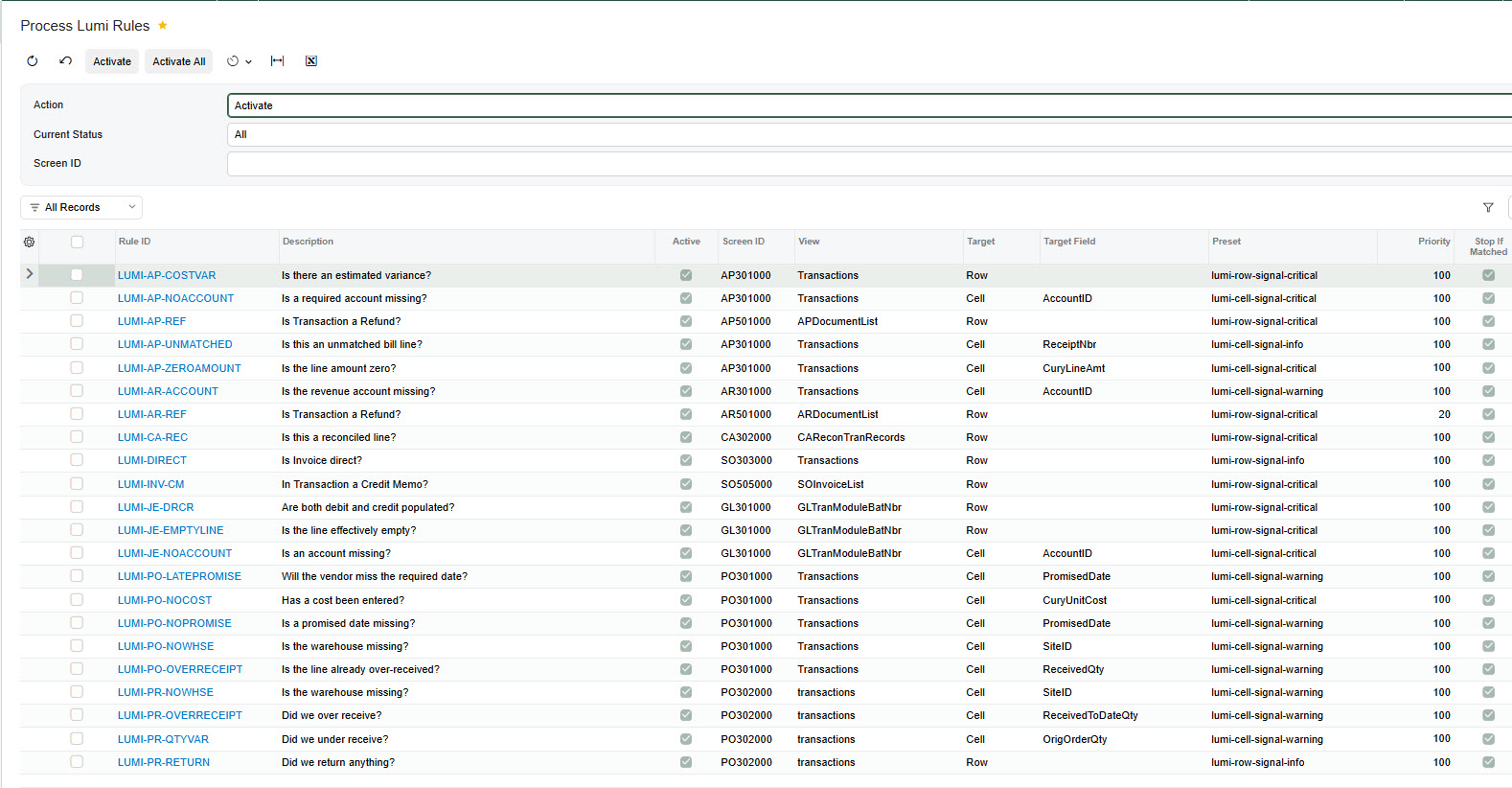
No publish step, no downtime. A saved, active rule takes effect the next time the target screen loads. A screen already open in someone's browser keeps showing the old result until it is refreshed.
What the license status means.
Lumi License Server (LM101000) shows one of four states. Whichever it shows, Acumatica itself keeps working exactly as it did.
Support
To log a support ticket email support@acugenconsulting.com.
Give every screen a second set of eyes.
Thirty days, your own Acumatica environment, every pack and edition, no credit card. Install Lumi Core, add the packs that match your Acumatica, and publish them together. The trial clock starts when you activate — not when you sign up.
The trial download is Lumi Core; packs and editions are on request while we finish packaging them for the trial. Ask us for the packs you need.
$1,200 a year for unlimited users, unlimited rules and all 145 screens, direct or through your Acumatica VAR. Try before you buy — that is why the trial is a full thirty days in your own environment. See the full price list.
Lumi is an Acugen Consulting product for Acumatica ERP. Not affiliated with, endorsed by, or sponsored by Acumatica, Inc.